
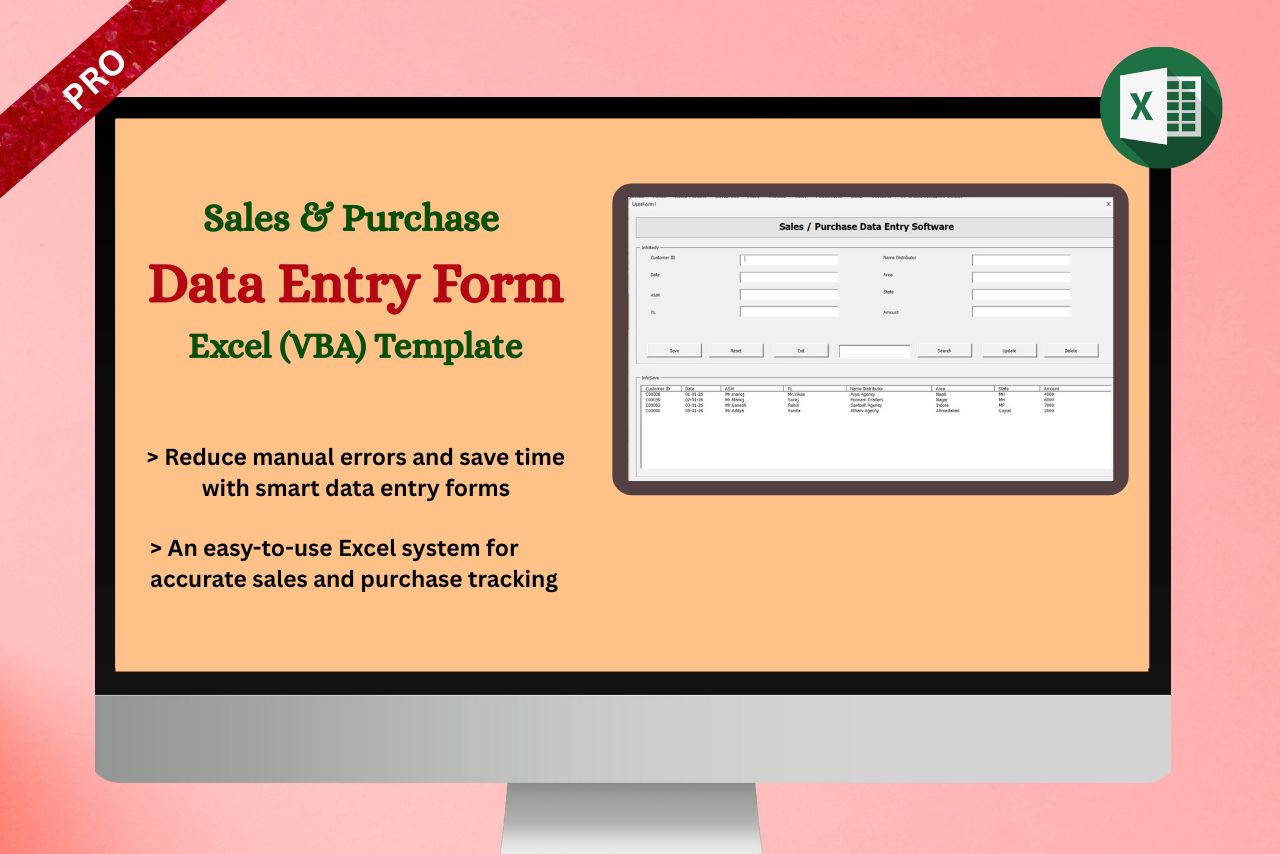
Template Description:
Our self-designed Template Sales & Purchase Data Entry Software in Excel (VBA) is a powerful, user-friendly solution developed to meet the practical needs of all manufacturing industries. It enables accurate and systematic recording of sales and purchase transactions with automated calculations, validations, and reports. Built using Excel VBA, the template reduces manual errors, saves time, and improves data consistency without the need for complex ERP systems. The software supports daily entries, party-wise tracking, item-wise analysis, and summary reporting, making it ideal for small to medium manufacturing units seeking efficiency, control, and flexibility in their business operations.
Features of Sales & Purchase Data Entry Software
♦ Useful in all business
♦ Easy to understand and editable
♦ You will learn many important Excel formulas
♦ Sales & Purchase Data Entry Software used a lot in multinational companies
♦ Dynamic Excel Digital Format
♦ Easy to Download file
Professional Sales & Purchase Data Entry Software in Excel Template
How the Sales & Purchase Data Entry Software in Excel Template Works
The Sales & Purchase Data Entry Software in Excel template is designed to help businesses record, track, and analyze sales and purchase transactions efficiently. It uses structured data entry fields and automatic calculations to reduce manual errors and save time
A. Data Entry Process
Users enter transaction details in a single, organized worksheet. Each row represents one sales or purchase record. The following fields are included:
1. Customer ID
A unique identification number assigned to each customer or vendor. This helps in tracking transactions customer-wise.
2. Date
The transaction date (sales or purchase). This allows easy filtering by day, month, or year for reports.
3. Area Manager
The name of the area manager responsible for the transaction. This helps in monitoring regional performance.
4. Team Leader
The team leader under whom the sale or purchase was made. Useful for team-wise performance analysis.
5. Distributor
The distributor involved in the transaction, enabling distributor-level tracking and reconciliation.
6. Area
The specific sales or purchase area, helping analyze location-based performance.
7 State
The state where the transaction occurred, useful for state-wise reporting and compliance tracking.
8. Sales / Purchase Amount
The total value of the transaction. This field is used for automatic calculations, summaries, and reports.
B. Automated Calculations
The template automatically calculates:
Total Sales Amount
Total Purchase Amount
Monthly and daily totals
Area-wise, distributor-wise, and manager-wise summaries
These calculations update instantly as new data is entered.
C. Easy Filtering & Search
The template allows quick filtering by:
Customer ID
Date range
Area Manager or Team Leader
Distributor, Area, or State
This makes it easy to find specific transactions within seconds.
D. User-Friendly & Customizable
No technical knowledge required
Easy to customize fields as per business needs
Works offline in Microsoft Excel
Suitable for small and medium-sized businesses
Structured & Start Data Entry Using VBA Forms
How VBA Sales & Purchase Data Entry Software Template Works
The VBA Sales & Purchase Data Entry Software is designed to simplify data entry, storage, and management using an automated VBA UserForm connected to Excel sheets.
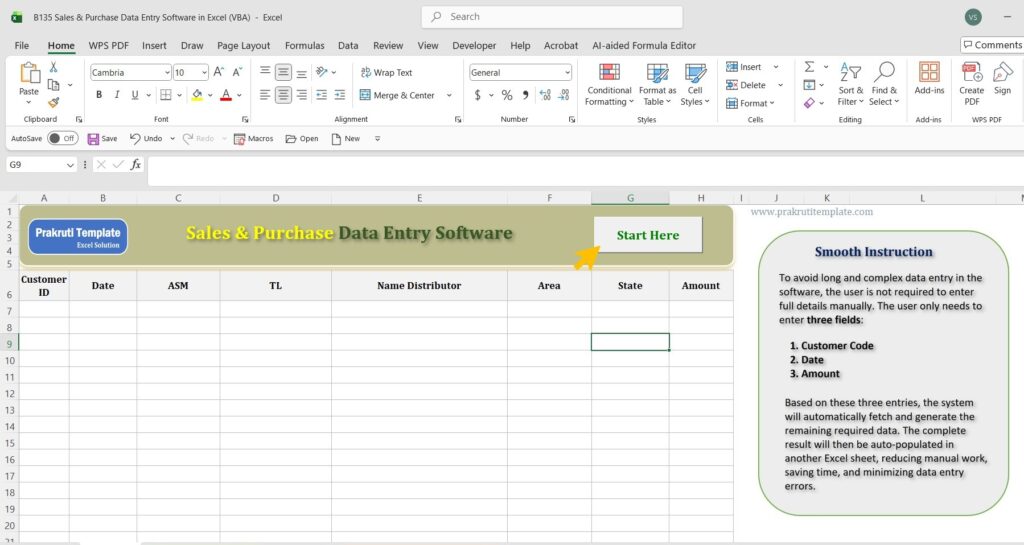
1. Start Button – Begin Data Entry
When you click the Start Button, the VBA Data Entry Form opens. This form is used to enter all sales or purchase details such as Customer ID, Date, Area Manager, Team Leader, Distributor, Area, State, and Sales or Purchase Amount.
Click > Start
Get Result >
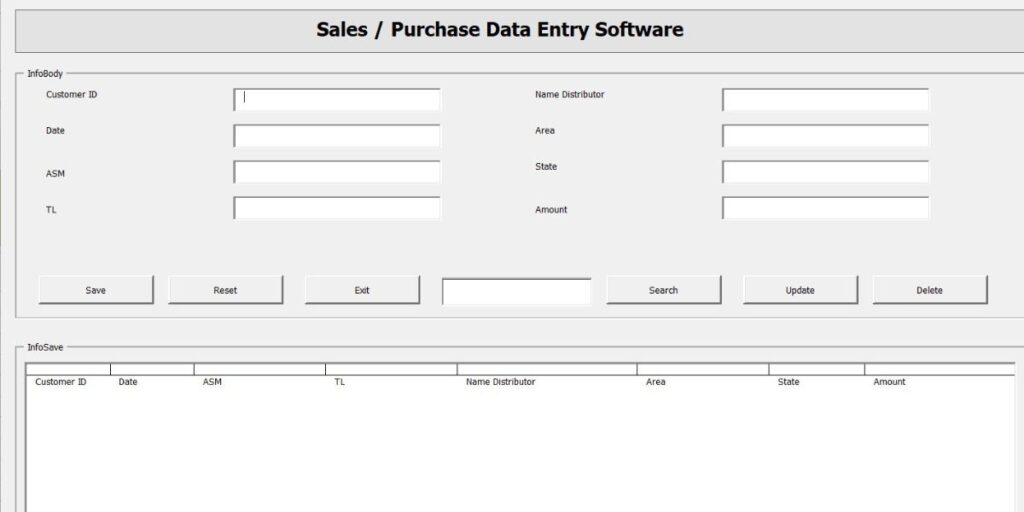
2. Type Entries in the VBA Form
Users enter all required information directly into the form fields.
The VBA form ensures structured and accurate data entry, reducing manual errors and duplication.
3. Save Button – Store Data Automatically
After completing the form, click the Save Button.
The entered data is automatically saved in:
Main Excel Data Sheet
Another linked sheet (for backup, reports, or summary purposes)
Each new record is added as a new row without overwriting existing data.
4. Reset and Exit Buttons
Reset Button
Clears all fields in the form so you can enter a new record quickly.
Exit Button
Closes the VBA form safely without affecting stored data.
5. Search, Update, and Delete Functions
The template provides powerful data management options:
a) Search Button
Enter the Customer Code and click the Search button.
The related record will appear in the form fields for review or editing.
b) Update Button
After searching and modifying the data, click Update to save changes.
The updated information is automatically reflected in the Excel sheet.
c) Delete Button
To delete a record:
First, select the row in the Excel sheet
Enter the Customer Code in the search field
Press the Search button
Click the Delete Button
The selected entry will be permanently deleted from the Excel sheet.
This VBA Sales & Purchase Data Entry Software Template provides a complete solution for managing sales and purchase records with ease. Using buttons like Start, Save, Reset, Search, Update, and Delete, users can efficiently control data entry and ensure accurate record management directly within Excel.
Download our own designed Excel Sales & Purchase Data Entry Software Template to manage transactions easily. This template features VBA-based data entry, automatic saving, search, update, and delete functions, and organized reports, helping businesses track sales and purchases accurately and efficiently.


.
Download Premium Sales & Purchase Data Entry Software in Excel (VBA)
PayPal for Other Country
Instamojo for India
Also Check & Download Templates
Sales Analysis Template in Excel | Sales Report | Free Download
CRMS Excel Template | Sales and Relationship Dashboard
Sales Trend Excel Template | Free Download
Smart Sales Report Excel Templates | Free Download
Consolidated Daily Sales Report in Excel
Hospital Business Analytical Report in Excel
Company Asset Sales & Survey Report
Easy to Use Quarterly Sales Chart Dashboard
Daily Sales Report Dashboard : Track, Analyze, and Grow Your Business
Customer Information Tracker in Excel
Asset Inventory Accounting Excel Template
Order Form in Excel | Warehouse Order Form | Free Download
Stock Reconciliation Excel Template | Free Download
Freezer Industry Stock Management Report
Product Repair Complaint Register and Cost Format
Automatic Cooler Stock Accounting Report
